
Templates vs. Reports: Saving Your Preferences in RPR’s Next Gen Reports

RPR’s Next Gen Reports are the new gold standard in real estate reporting. With them, REALTORS® now have a modern, flexible way to create client-ready property and market reports. The improved system provides cleaner design, live previews and customization tools that make every report look polished and professional.
But one area that’s raised some questions is the difference between templates and reports. If you’ve wondered how they work together, you’re not alone. Let’s clear that up!
What templates are (and aren’t)
A really easy way to define templates is to think of them as your report preferences. A template is simply a saved set of choices that determine what you want included or excluded in a report.
RPR provides a handful of “starter” templates to help you get going—Buyer, Seller, CMA, Market Activity, etc. These are based on user research that revealed what most REALTORS® tend to use in those situations. For example, the Buyer template highlights active listings and property details, while the Market Activity template emphasizes sales trends and neighborhood data.
But here’s the key: a template is not a final report. It’s just the structure and a starting point. Once you apply it, you’ll generate and save a full report that you can view, share or download.
Customize for your clients
Every client is different. Some want the “kitchen sink”—every chart, stat and property detail. Others prefer a slimmed-down version with just the essentials.
That’s where Next Gen really shines. You can start with one of RPR’s pre-provided templates, then drag and drop, reorder sections, add custom pages and toggle features on or off in real time. For example:
Once you’ve customized it, and created what you consider to be the “perfect” report base, you can save it as your own template. That means every time you create a report for a similar client type, you don’t have to re-do the work. Just select your saved template, make any modifications (if any) and you’re ready to go.
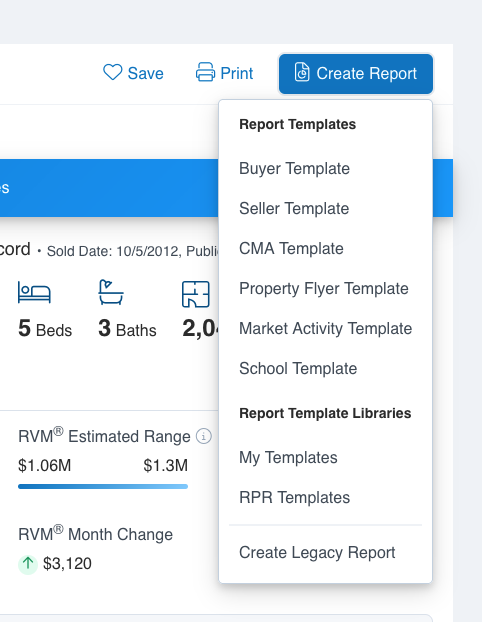
RPR “starter” templates are offered under the “Create Report” menu pulldown as “RPR Templates.” But when you use a starter template to create and save a report, you can also save that version as a template for future use(s). Which can then be found in “My Templates.”
The reports vs templates takeaway
We know there’s a little bit of a chicken and egg going on for some people. Think of it this way:
- Templates = Preferences. Your saved choices for what a report should look like.
- Reports = Deliverables. The client-ready document built from your template or an RPR starter template.
RPR provides starter templates, but your saved templates are the true game-changer—personalized, reusable and built for your workflow.
Once you’ve created your go-to templates, generating polished, professional reports becomes a matter of seconds, not minutes. And because reports automatically update every 48 hours, your clients are always getting the freshest data.
Templates are your preferences. Reports are your deliverable. Together, they make Next Gen faster, easier and smarter than ever!
Share This Story, Choose Your Platform!
Related Posts




One Comment
Leave A Comment
TOPICS
AUDIENCE
CATEGORIES


TUTORIALS & GUIDES
SUCCESS STORIES
PROSPECTING
THE PODCAST

[…] post Templates vs. Reports: Saving Your Preferences in RPR’s Next Gen Reports appeared first on Realtors Property Resource […]