
How to Turn RPR Reports Into Lead-Generating Neighborhood Guides

A Modern Agent’s Guide to Building Local Expertise, Authority and Business
In a competitive market, the agents who win are the ones who bring clarity, context and confidence. Clients don’t just want listings, they want to understand what’s happening in the market and why.
That’s where RPR’s Next Gen Reports come in.
RPR’s new reporting experience recently came out of beta and is now the default. These Next Gen Reports offer modern templates, more customization and dynamic updates—replacing legacy reports, which will be fully retired in November.
In this guide, you’ll learn how to turn RPR reports into high-impact lead magnets, whether you’re emailing, posting to social media, hosting an open house or adding to your website.
- Turn RPR Neighborhood and Market Activity Reports into local guides
- Build custom PDF templates tailored to buyers, sellers or investors
- Use these reports as downloadable lead magnets on social, in email or your site
- Layer them into a content strategy
Let’s make RPR Reports the centerpiece of your lead generation engine.
What Makes RPR Reports So Valuable for Lead Gen?
Your clients want answers to questions such as:
- “How’s the market in my neighborhood?”
- “Is this a good time to sell?”
- “What schools serve this area?”
- “What’s the vibe of this part of town?”
RPR’s Next Gen Reports are built to help agents deliver answers with confidence. Every report is packed with credible, current and client-friendly data presented in a way that’s easy to share and personalize. The reports are:
- Professionally designed: Clean, modern layouts that make a strong visual impression
- Built for every market: Works across residential and commercial
- Branded to you: Add your name, photo, logo and contact info to every report
- Customizable: Personalize layout by toggling and reordering report sections
- Template builder: Configure, save and reuse report setups that match your style
- Dynamically updated: Refreshes every 48 hours when viewed via link
- Easy to deliver: Share via email, print, PDF, social media and more
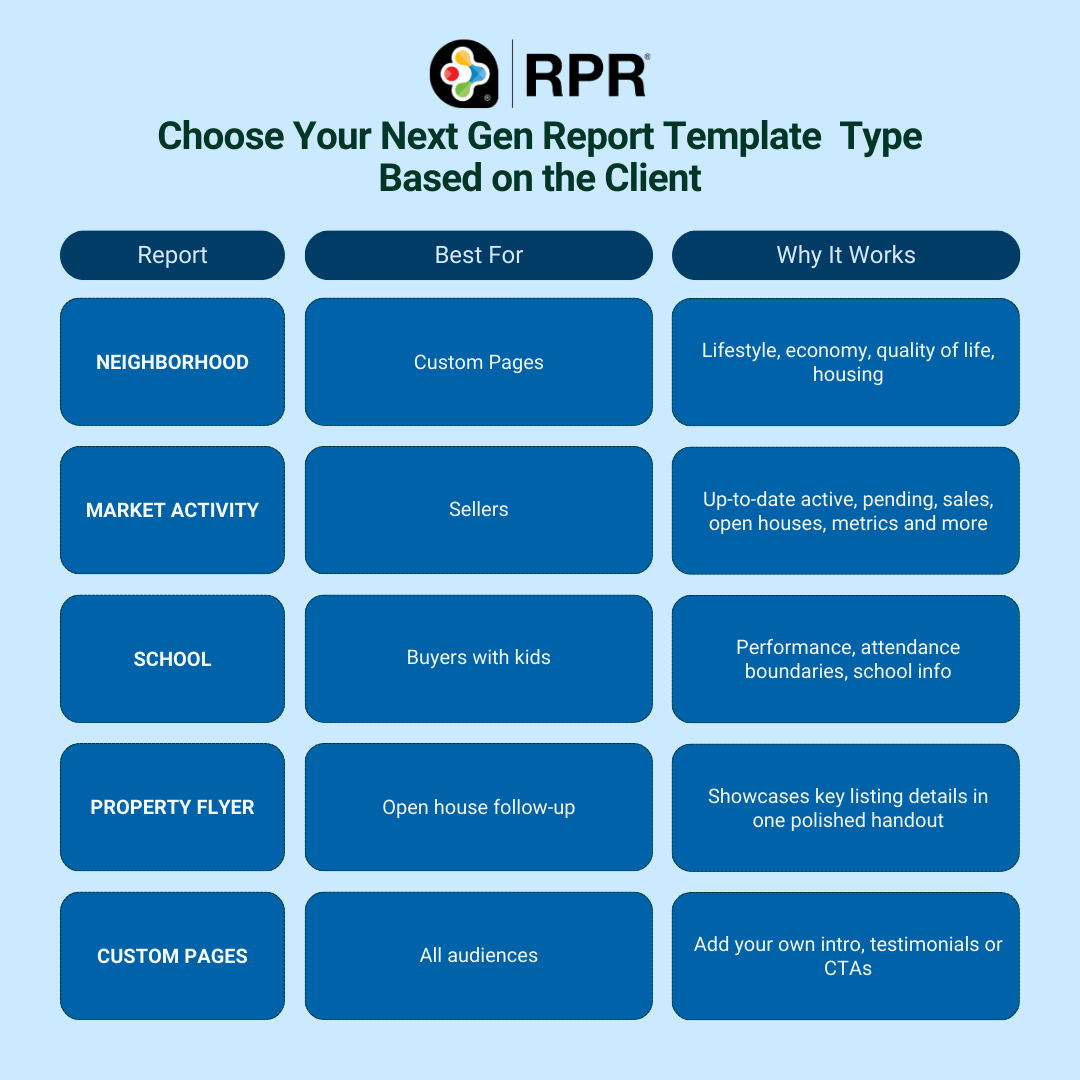
Choose Your Report Type Based on the Client
Personalize Every Report With Branding + Custom Pages
Every RPR Report you share is a reflection of your brand, and with a few quick steps, you can turn it into a powerful, lead-ready marketing asset. Here’s how to customize the experience:
Start With Your Branding
Set it up once and it’s applied automatically:
- Add your photo, logo and contact details in your RPR profile
- Choose which report sections to include… focus on what your client cares about most
Tip for Broker/Owners: Upload universal pages such as brand values, vendor lists or relocation services so every agent starts with polished, on-brand content they can personalize. Enroll Your Brokerage Now.
Then Elevate It With Custom Pages
Custom Pages allow you to embed your own branded content directly into the report—before, during or after the core RPR content. Want full control over the look and feel? You can even replace the default cover page by turning it off and inserting your own branded version using Custom Pages.
- Agents can upload up to 5 custom PDFs
- Brokerages can add 5 more PDFs that are available across all agent reports
- Each PDF can be multi-page and updated at any time
- Custom Pages can be placed anywhere in the report (even as the cover)
- Toggle custom pages on or off per report—tailor it to the moment
Think of Custom Pages as branded inserts like team bios, selling and buying tips, testimonials and CTAs that personalize your report and guide the client experience.
Strategic Ideas for Custom Pages
Use Custom Pages to tell your story, build trust and lead clients or prospects to take the next
Buyer Resources
- “Buying in [City]” guide
- Step-by-step home buying timeline
- Local lender contact sheet
- Tips for winning in a competitive market
Seller Tools
- “Selling Smart” checklist
- Staging tips
- Agent value breakdown
- Recent success stories/testimonials
Local Expertise
- Neighborhood spotlight: local favorites, restaurants, parks
- Map of your service areas
- “Meet the Team” or your personal intro
Calls to Action
- QR code or link to book a free consult
- “Want a custom valuation? Here’s how to get started”
- “Join my monthly market update email list”
Video or Lead Capture
- Page with QR to a welcome video
- Link to a lead form or home valuation tool
- Embed a dynamic tool (like your calendar link or lead magnet landing page)
Canva Templates
Offer Reports as Lead Magnets
You don’t need fancy tech. Just clear positioning and a smart CTA.
Where to Offer Your Reports
- Your email signature: “Need the latest [City] Market Update? Click here.”
- Your social profiles: Link to a landing page or lead form
- Open house sign-in: “Get a full neighborhood guide delivered to your inbox”
- QR codes on postcards or flyers
- Email newsletters: Offer monthly updates
- Text-to-download: Use a short code + landing page
You Already Have the Content—Now Use It to Win
It’s easy to overlook what’s already at your fingertips: real-time, hyper-local data that’s branded, personalized and built to convert. RPR makes it simple to package insights your clients actually care about.
Whether you’re door-knocking, posting to Instagram, or building your website, your RPR reports can now work harder, look sharper and help you win more business.
Share This Story, Choose Your Platform!
Related Posts




One Comment
Leave A Comment
TOPICS
AUDIENCE
CATEGORIES


TUTORIALS & GUIDES
SUCCESS STORIES
PROSPECTING
THE PODCAST

[…] post How to Turn RPR Reports Into Lead-Generating Neighborhood Guides appeared first on Realtors Property Resource […]